Postback
How Does Facebook Conversion Tracking Work?
Conversion tracking is an integral part of your broader digital marketing strategy.
October 23, 2026

Native Meta CAPI Gateway. Support server-side conversion delivery directly to Facebook without browser pixel limitations. Campaigns train faster.
Start 7-Day Free TrialRemember the old Facebook pixel JavaScript snippets? The old pixel sits in a browser as it waits for a script to fire. Modern browsers block those scripts. As an affiliate marketer you lose data, so you also lose cash.
Meta cannot optimize your campaigns without data. It needs to know who buys, and it needs to know who clicks. When your browser tracking breaks, Meta flies blind.
The Meta Conversions API (CAPI) solves this problem. It shifts the power away from the browser. Instead, your web server talks straight to Meta endpoints. This is a direct server-to-server link. No third-party cookies are required. No browser ad blockers can stop the transmission.
With CAPI, your server calls Meta's server directly to transfer the sales data. There is no middleman browser to intercept the message or cut the cord.
The old pixel lives on the client side, meaning it operates entirely inside the user's web browser. If that browser is running an extension like uBlock, your data dies on the spot.
| Facebook Pixel | Meta CAPI | |
|---|---|---|
| Where it runs | Client side, inside the user's browser | Server side, straight from your backend |
| Ad blockers | Data dies on the spot with uBlock & co. | Nothing to intercept — direct server link |
| Cookies | Relies on dying third-party cookies | Uses your own secure first-party data |
| iOS & Apple prompts | Crippled tracking of iOS users | Bypasses device-level limitations |
| Data control | Blindly fires whatever the browser grabs | You choose what to send and when |
| Accuracy | A shaky estimate of your traffic | Hard facts from your sales database |
The core difference comes down to ownership and reliability. The pixel gives you a shaky estimate of your traffic based on what a browser allows it to see. CAPI gives you hard, undeniable facts directly from your backend sales database. You stop guessing which ads actually drove the conversions because your server keeps the ledger accurate.
Then you have the cookie problem. The old pixel relies heavily on third-party cookies, which tech companies are actively phasing out. CAPI bypasses this dependency entirely by using your own secure, first-party data. It sends parameter packages like email hashes and click IDs directly across the server link.
The pixel blindly fires off whatever information the browser happens to grab during a page load. With CAPI, you control the pipeline. You choose exactly what data packets to send to Meta and when to send them.
Apple tracking prompts completely crippled the pixel's ability to trace iOS users across the web. Because CAPI uses a direct server-to-server handshake, it bypasses those device-level browser limitations completely.
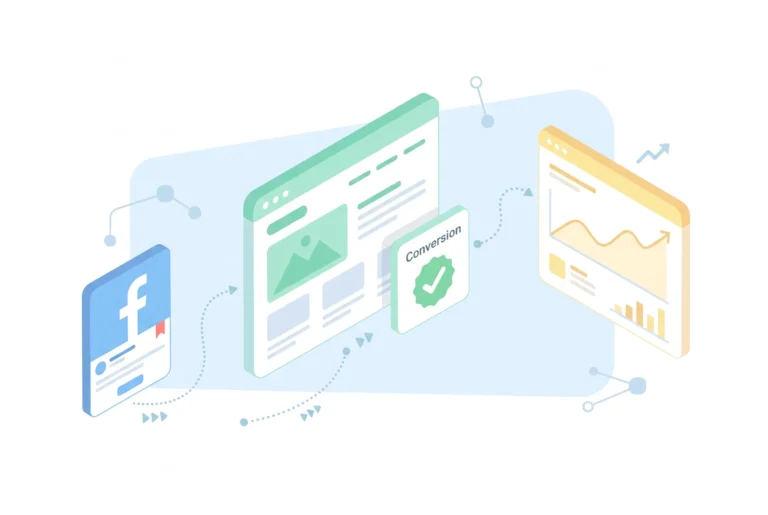
The actual mechanics of CAPI come down to a behind-the-scenes handshake. When a visitor lands on your landing page, a unique tracker string generates immediately. This identifier is usually the Facebook Click ID, or the FBCLID. Your system ties this specific ID to that individual session.
A unique FBCLID is generated immediately and tied to that individual session.
On a click or purchase, your server wraps the event with customer info like an email or phone number.
Security protocols hash all data before it travels to Meta, satisfying privacy laws while keeping the identifier unique.
If the user interacts with your page or hits a buy button, the server captures that action. Your server wraps up that action data along with customer information like an email address or phone number.
Before sending anything, security protocols take over to encrypt all data. It satisfies privacy laws while keeping the identifier unique.
A top-tier native KLO system that entirely replaces paid 3rd-party subscriptions. Blocks ad platform reviewers, bots, spy tools, VPN/Proxy, and more.
Zeus Hybrid keeps the core tracker URL hidden in a private cloud while landing pages run externally. When an IP gets flagged, no manual server migration is needed.
Most trackers sell access based on click volume. Zeustrack has no click events scale limit and never charges overages, even on the entry-level plan.
Redirect-free tracking is critical for Facebook, TikTok, and Google. Built-in hosting lets you manage landing pages directly from the tracker interface.
Paste any trusted URL and the tracker instantly clones the site and deploys it as your White Page. One step instead of manual HTML wrangling.
Zeustrack runs on an enterprise cloud architecture built for infinite volume without dropping a single click. VPS trackers crack under heavy load.
Server-side conversion delivery directly to Facebook, TikTok, Google, and Snapchat without browser pixel limitations. Campaigns train faster.
Replace suspicious tracking URLs with clean short links. Set a custom preview image and description directly in your campaign settings to appear when you paste the link.
No more manual stat matching. Connect multiple accounts and pull exact real-time ad spend from Facebook directly into your tracker dashboard.
Keep your ad conversion rates high. Our built-in Zeustool automatically hides negative comments on your active Meta campaigns without the need for external moderation services.

The definitive all-in-one stack. Launch and scale your campaigns without juggling multiple tools. Handle huge traffic volumes without ever touching a server config.

Built for infinite scaling. Give buyers, farmers, and accountants granular access to specific flows, domains, and global stats without compromising your funnels.

Launch campaigns without hiring a developer or configuring your own VPS. Zeustrack provides a fully managed cloud setup out of the box.
Classic
€29/month
annually
€39/month if monthly
Optimal
€119/month
annually
€149/month if monthly
Pro
€239/month
annually
€299/month if monthly
CAPI stands for Conversions API. In Meta advertising, it refers to a server-to-server data connection that links your marketing data straight to Meta servers. Instead of tracking user actions inside a fragile web browser like Chrome or Safari, CAPI allows your web server to log conversions directly from your backend database. This connection bypasses browser ad blockers, cookie restrictions, and mobile device limitations. It sends encrypted, hashed packets of data to ensure compliance with privacy regulations.
The pixel tracks actions inside the user's browser, making it vulnerable to ad blockers, deleted cookies, and Apple privacy updates. Facebook CAPI operates entirely on the server side, capturing events directly from your database. The pixel depends on what a browser allows it to see, while CAPI creates a secure, direct link that passes data straight to Meta, ensuring your affiliate conversion tracking remains fully accurate and bulletproof.
Moving tracking to your own server changes your legal duties. You are pulling names, phone numbers, and emails straight from your sales database. This means strict privacy laws apply to your setup immediately. Your server must hide this information before sending it. The system uses SHA-256 hashing rules to encrypt the details. This turns clear customer text into random strings, keeping the data transfer safe.
You need a Facebook conversion API because traditional browser-based tracking is essentially dead. With browser privacy changes, ad blockers, and Apple iOS restrictions constantly scrubbing out cookies, you are losing massive amounts of data. Without that data, Meta cannot optimize your affiliate campaigns, meaning your ad spend burns away while your target metrics go blind. CAPI creates a secure, direct server-to-server connection that feeds your backend sales ledger straight to Meta.
Integrating Meta CAPI depends entirely on your setup and strategy. If you use e-commerce platforms like Shopify or WooCommerce, use their built-in partner links. You just connect your Facebook profile inside their dashboard settings, toggle the advanced tracking button, and the system handles the server loops instantly.
Stop losing conversions to ad blockers, iOS prompts, and dying cookies. Start your 7-day free trial today and switch to native server-side Meta CAPI delivery built for infinite scale and zero click loss.
Start 7-Day Free Trial